Visual timeline planner that maps your day hour by hour
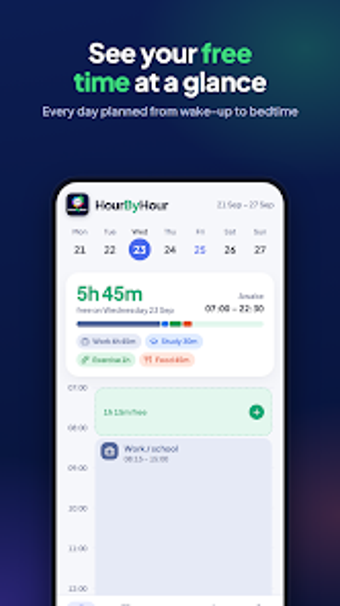
Maps your entire day as a continuous, color-coded timeline, letting you place activities with exact start and end times (for example, 08:15 to 09:45) and set them to repeat on selected weekdays. HourByHour, from T1K LTD, focuses on daily flow rather than list items, showing pockets of available time at a glance. The app targets students, parents, and professionals who prefer a visual schedule and need quick daily edits and clear routine signals.
How the app represents a day in practical terms
HourByHour displays a continuous timeline that spans wake-up to bedtime, so you see your day as a single spatial layout rather than separate entries. The app supports precise time-blocking, allowing non-standard intervals such as 08:15 to 15:00, and uses a simplified color-coding system to mark categories like work, exercise, or chores. That visual layout helps users spot short free segments that are hard to find in grid calendars.
Where it fits into daily routines and habit building
The tool emphasises routine by letting you place recurring activities on specific weekdays, so repeated sessions reappear automatically on the days you choose. That approach makes the app suited to people who follow fixed patterns, such as parents scheduling school runs, students planning study blocks, or professionals who keep repeating work blocks. The focus is daily flow, which encourages building a predictable day-to-day rhythm.
Interaction, onboarding, and on-device performance
The interface is described as clean and designed for quick daily updates, so tapping to add or adjust a block fits short bursts of planning in the morning. The app is lightweight on Android devices, which the developer highlights to reduce load during active use. Color assignment and direct time entry aim to keep edits fast when your routine shifts.
Compatibility and where it may not replace other planners
HourByHour is available for Android and targets modern devices for full functionality. Because it presents a single-day timeline rather than a multi-month calendar grid, it suits users whose primary need is day-level flow; users needing month-over-month planning or a traditional calendar grid may still rely on separate tools alongside this app.
To sum up, a visual daily planner for routine-focused users
HourByHour works well for people who want a spatial view of a single day and dependable repeating slots for routines. It serves weekend planners, busy parents, and students who prefer visual time blocks, but it's less appropriate if you need a conventional month or agenda view. A practical tip: set recurring entries for core activities first, then fill remaining gaps each morning.